Dictation Statistics
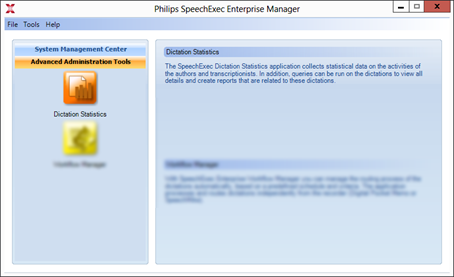
The SpeechExec Enterprise Statistics application collects statistical data on the activities of the authors and transcriptionists. In addition, queries can be run on the dictations to view all details and create reports that are related to these dictations. The user interface elements (for example, dialogs, button names and so on) may be slightly different in other operating systems. To start the program, run SpeechExec Enterprise Manager first, and click the SpeechExec Dictation Statistics icon.
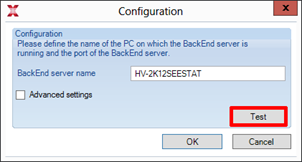
When starting the application, specify the Backend server name and port, to which SpeechExec Dictation Statistics must connect. With the Test button you can test whether the connection to the server is successful. To confirm the settings, click OK.
Note
SpeechExec Dictation Statistics needs successful connection to the Backend server in order to function.
Backend server name - Enter the hostname or the IP address of the selected Backed server.
BackEnd server port - Enter the port of the selected BackEnd server (the default port is 49255).
Installation process
It is recommended that the latest available Service Pack is installed on the operating system. Currently, the Enterprise modules are 32-bit applications and therefore run in 32-bit compatibility mode on supported 64-bit operating systems.
SpeechExec Enterprise Backend Server requires that you have Microsoft .NET 4.8 Framework installed. If it is not present on your system, it will be installed automatically during SpeechExec installation.
Important
You need to have administrator rights in order to install the program, otherwise an 'ikernel' error message is displayed at the beginning of the installation process.
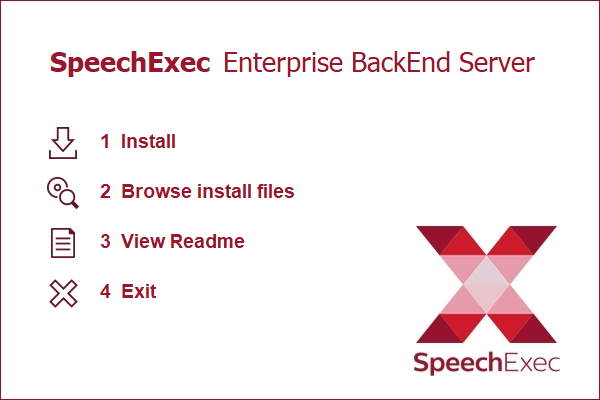
Open Folder and click on Install.
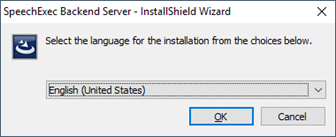
Select your preferred language from available: Czech, Danish, Dutch, English, Finnish, French, German, Norwegian, Spanish, and Swedish.
Click on OK
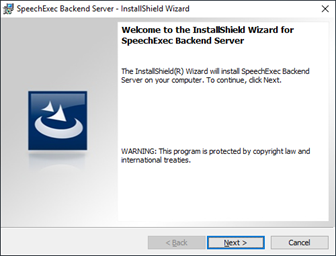
Click Next
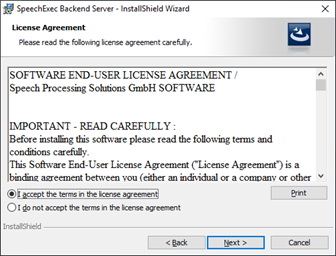
Accept the license agreement and click Next.
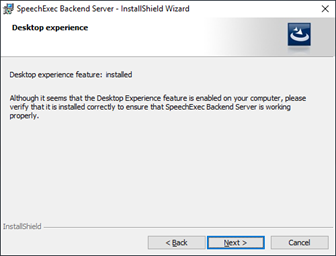
Click Next
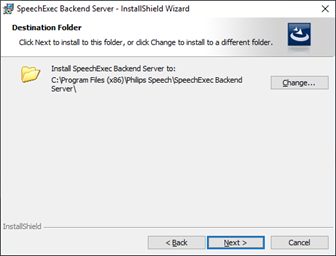
Choose the destination folder and click Next.
Click Install to begin the installation
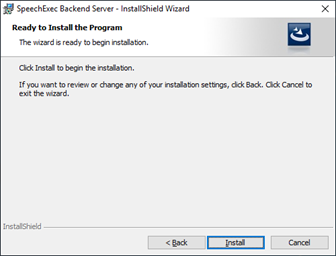
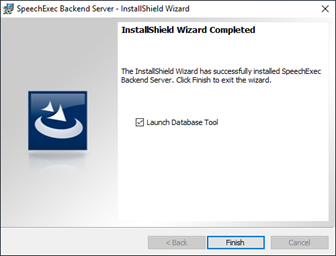
If you will connect the Backend server immediately with the Database, click on Finish to start the configuration tool
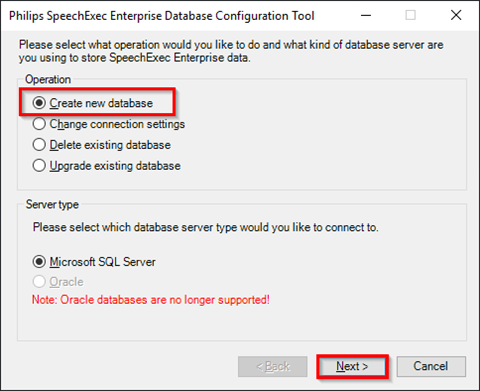
If you already had the statistics in use, select Upgrade existing database and the propriate server type and click Next, in other case click Create new database and click Next.
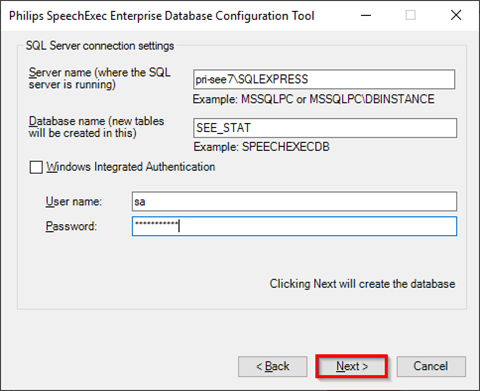
Depending on your Microsoft SQL server settings you have to enter the following information:
Server name / Service name - the name of your database server (and service instance name, if applicable).
Database name - the name of the database that you want to query.
Windows Integrated Authentication - Select this option if you want to use your Windows user name and password. User name / Password - enter the user name and password that you want to use for accessing the database.
Click on Next
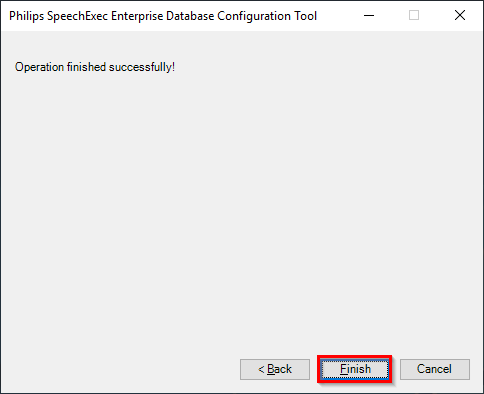
Click Finish to close the configuration tool.
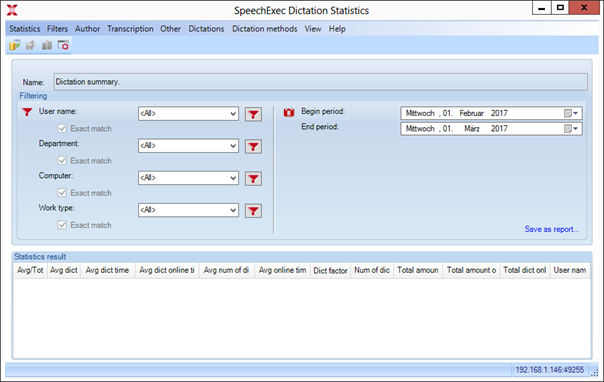
Main Window
The main window of the Dictation Statistics tool provides an overview on the query result and the filtering conditions defined prior to running the query.
Menu Bar
From the menu bar of SpeechExec Dictation Statistics you can select the queries to run, configure the database to be queried and delete dictation files from the database.

Statistics
In this menu, you can adjust the configuration of the application, reach the toolbar items and exit the SpeechExec Dictation Statistics.
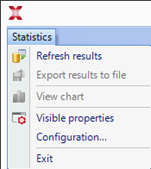
Refresh results - executes the selected statistics based on the given filtering information. You can also execute the selected statistics with the F5 shortcut key.
Note
In Delete statistics, this option is called Execute, and clicking it will delete all of the dictation information older than the specified date.
Export results to file - saves the statistics result in .xls (Microsoft Excel sheet) format.
View chart - presents the selected statistics information in column chart and pie chart.
Note
This option works only if the selected statistics supports chart display
The chart display contains the following options:
Export chart - with this option, you can save the chart display in the following formats: .rpt, .pdf, .xls, .doc, .rtf.
Print chart - with this option, you can print the chart display.
Zoom - with this option, you can change the size of the page.
Column chart - with this option, you can check the statistics information displayed in column chart.
Pie chart - with this option, you can check the statistics information displayed in pie chart.
Visible properties - presents the properties to be displayed under Statistics result list elements. You can select which properties to be displayed by checking in the checkboxes of the elements.
Note
This option works only with the following statistics:
Dictation summary
Transcription summary
The list of non-transcribed dictations with corresponding information
Delay
Job statistics
Configuration - with this option, you can specify the BackEnd server name and port (the default port is 49255), to which SpeechExec Dictation Statistics must connect. With the Test button you can test whether the connection to the server is successful. To confirm the settings, click OK.
Note
SpeechExec Dictation Statistics needs successful connection to the BackEnd server in order to function.
Exit - with this option, you can exit the application and return to SpeechExec Enterprise Manager.
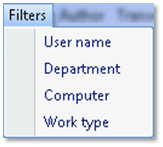
Filters
From the Filters menu, you can filter your search results according to several pre-defined filtering conditions.
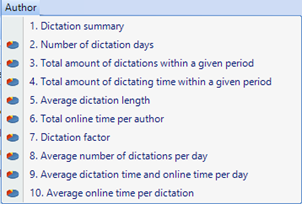
Author
From the Author menu, you can run queries that are associated with the author role.
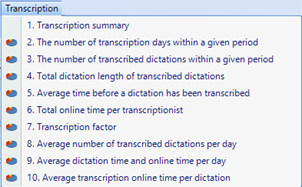
Transcription
From the Transcription menu, you can start queries that are associated with the transcriptionist role.
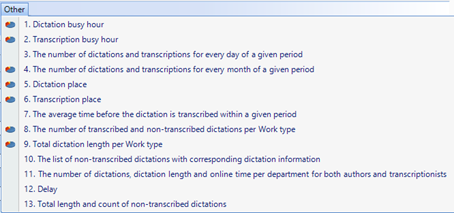
Other
From the Other menu, you can run queries that produce dictation information that cannot clearly be associated with authors or transcriptionists.
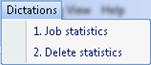
Dictations
The only query in the Dictations menu displays the most detailed information on the individual dictation files.
Dictation methods
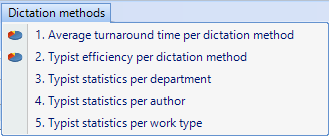
From the Dictation methods menu, you can run queries that produce dictation information related to the dictations methods.
View
From the View menu, you can toggle the visibility of the Saved reports panel by clicking the Show/hide saved reports menu item.
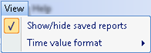
From the View menu, you can also specify how to display the Time value format. You can choose from one of the following options: day.hour:minutes:second (D.HH:mm:ss) day:hour:minutes:second (D:HH:mm:ss)
Authors statistics
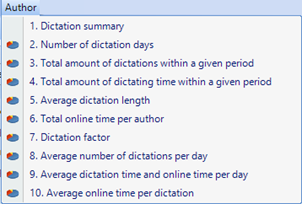
This chapter describes the dictation statistics queries that are available for analyzing the work of authors. The available queries are described in the following sections:
Dictation summary
Number of dictation days
Total amount of dictations within a given period
Total amount of dictating time within a given period
Average dictation length
Total online time per author
Dictation factor
Average number of dictations per day
Average dictation time and online time per day
Average online time per dictation
The following chapters describe in detail the functions
Dictation summary
This query summarizes several kinds of statistics. The summary also calculates an average and total for certain statistics, displayed at the bottom of the result list. Statistics result list elements:
Avg/total - the average and total that is calculated for the individual statistics (displayed at the bottom of the list).
Avg dict length - the average length of dictations in seconds.
Avg dict time per day - the average time (in hours) per day when authors recorded dictations.
Avg dict online time per day - the average time (in hours) per day when authors actively used the Recorder/Player.
Avg num of dict per day - the average number of dictations per those days when authors created recordings.
Avg online time per dict - the average time (in minutes) per dictation when authors actively used the Recorder/Player within the specified time interval.
Dict factor - The time of the dictation process of authors.
Num of dict days - The number of days when authors recorded dictations.
Total amount of dict - The number of dictations within the specified time interval.
Total amount of dict time - The total dictation hours within the specified time interval.
Total dict online time - The total time when authors actively used the Recorder/Player.
User name - The name of the selected author(s).
Calculation method: An additional Average/Total column is added to show the Average and Total values for certain columns in the bottom two rows. Average values are calculated for all columns except User name. Total values are calculated only for the following columns:
Number of dictation days
Total amount of dictations
Total amount of dictating time
Total dictation online time
The average value for the column Average number of dictations per day is not calculated as an average of the per-user column values, but as an average of the total source data set.
Number of dictation days
By querying the number of dictation days, you can calculate those days when the authors were recording dictations. Settings begin and ends periods is mandatory for this query.
Statistics result list elements
User name - The name of the selected author(s).
Days - The number of days when the individual authors recorded dictations.
Calculation method: Only those days are calculated, which are assigned with any dictation action’s EndTime. That is, when the individual authors were actually recording dictations.
The total amount of dictations within a given period
This query displays the number of dictations within the selected time interval. Setting the begin and end periods is mandatory for this query.
Statistics result list elements
User name - the name of the selected author(s).
Amount - the number of dictations within a specified time interval.
The total amount of dictating time within a given period
This query shows the dictating hours and the time that an author spent online during a specified interval. Online in this case means that the author actively used the Recorder/Player. This statistic includes only dictations that were finished within the specified time interval. Statistics result list elements
User name - the name of the selected author(s).
Dictation time - the total dictation hours within the specified time interval.
Online time - the total time that an author spent on using the Recorder/Player.
Average dictation length
This query calculates the average length of dictations for every author. If two or more authors begin dictating at the same time (that is, their dictations have the same ID) and record dictations of the same length, this query will include only the dictation of which Computer property is the first in alphabetical order. Therefore, if, for example, Author A on Computer 6 and Author B on Computer 2 begin dictating simultaneously and record the same length of dictation, only the dictation of Author B will be included in the query since the name of this computer is first in alphabetical order. Statistics result list elements.
User name - the name of the selected author(s).
Avg dictation length - The average length of dictations within the specified time interval.
Calculation method:
Calculates the average dictation length of dictations. Only the most recently changed DetailedDictation records are included (EndTime value = the maximum EndTime values recorded for a given dictation ID). If there are two or more records for the same dictation and same EndTime, then only that one is used which has the maximum ComputerName (in alphabetical order).
Total online time per author
This query summarizes the period during which the individual authors used the Recorder/Player. This statistic includes only dictations that were finished within the specified interval.
Statistics result list elements
User name - The name of the selected author(s).
Online time - The total time period during which an author uses the Recorder/Player.
Calculation method: Summarizes the OnlineTime fields. Only those DetailedDictation records are used of which EndTime value is in the specified time interval.
Dictation factor
The dictation factor statistics provides information on how long the process of dictation takes for individual authors. This is counted by dividing the sum of online time with the total dictation length within the specified time interval.
This statistic includes only dictations that are finished within the specified interval. If there are two or more recordings with the same dictation ID and ending at the same time, then only that dictation will be included in this query of which Computer property is the first in alphabetical order. For instance, if Author A on Computer 6 and Author B on Computer 2 begin dictating simultaneously and record the same length of dictation, then only the dictation of Author B will be included in the query since the name of this computer is first in alphabetical order.
Statistics result list elements
User name - the name of the selected author(s).
Factor - the sum of online time divided by the total dictation length.
Calculation method:
The sum of online time is divided by the sum of dictation length. Only the most recently changed DetailedDictation records are included (EndTime value = the maximum EndTime values recorded for a given dictation ID). If there are 2 or more records for the same dictation (dictation ID) and same EndTime, then only that one which has the maximum ComputerName (in alphabetical order) is used.
Average number of dictations per day
This query displays the average number of dictations per those days when the author created recordings. This statistic includes even dictations that are only started but not yet finished. Statistics result list elements
User name - the name of the selected author(s).
Average - the average number of dictations that the author created per day.
Calculation method: This statistics includes all dictations regardless of being finished or not. Calculates those dictations of which EndTime is in the specified interval and divides this number with the number of days when the user created dictations (which is also determined based on the EndTime field).
Average dictation time and online time per day
This query summarizes two time per day averages
when individual authors recorded dictations
average of durations when the authors used the Recorder/Player.
Statistics result list elements
User name - the name of the selected author(s).
Average dictation time – the average time – in hours – per day that the author spent on recording dictations.
Average online time – theaverage time – in hours – per day when the author actively used the Recorder/Player.
Calculation method: Average dictation time: summarized EndTime - BeginTime divided by the number of those days when the user had dictations. Online time per day: summarized OnlineTime divided by the number of those days when the user had dictations.
Average online time per dictation
This query displays the average time per dictation during which an author was using the Recorder/Player within the specified time interval.
Statistics result list elements
User name - the name of the selected author(s).
Average - the average time (in minutes) when the author actively used the Recorder/Player.
Calculation method: Summarized Online Time in the specified interval divided by the summarized number of dictations of the user in the same interval.
Transcriptionists statistics
This chapter describes the dictation statistics queries that are available for analyzing the work of transcriptionists.
The available queries are described in the following sections:
Transcription summary
The number of transcription days within a given period
The number of transcribed dictations within a given period
Total dictation length of transcribed dictations
Average time before a dictation has been transcribed
Total online time per transcriptionist
Transcription factor
Average number of transcribed dictations per day
Average dictation time and online time per day.
Average transcription online time per dictation.
The following chapters describe in detail the functions for every reports.
Transcription summary
This query summarizes several kinds of statistics. The summary also calculates an average and total for certain statistics, displayed at the bottom of the result list.
Visible properties - here you can select the properties to be displayed under Statistics result list elements by checking in the checkboxes of the elements.
Statistics result list elements
Avg/total - the average and total that is calculated for the individual statistics (displayed at the bottom of the list).
Avg trans dict time per day - the average time (in hours) per day that transcriptionists spent on transcribing dictations.
Avg trans online time per day - the average time (in hours) per day when transcriptionists actively used SpeechExec Player.
Avg num of trans dict per day - the average number of dictations per day that the transcriptionists finished transcribing.
Avg trans online time per dict - the average time (in minutes) per dictation when transcriptionists actively used SpeechExec Player.
Num of trans dict - the number of transcribed dictations within the specified time interval.
Num of trans days - the number of days when transcriptionists transcribed dictations.
Total dict length - the total transcribed dictation hours within the specified time interval.
Trans total online time - the total time that transcriptionists spent on using the SpeechExec Player.
Trans factor - the time of the transcription process of transcriptionists.
User name - the name of the selected transcriptionist(s).
Calculation method: An additional Average/Total column is added to show the Average and Total values for all columns in the bottom two rows.
Average values are calculated for all columns except User name.
Total values are calculated only for the following columns:
Number of transcribed dictations
Number of transcription days
Total dictation length (of transcribed dictations)
Total transcription online time
The average value for the column Average number of transcribed dictations per day is not calculated as an average of the per-user column values, but as an average of the total source data set.
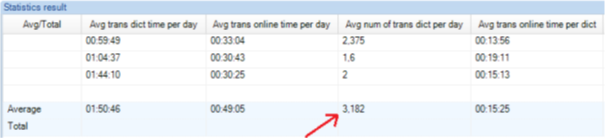
As an example, see the following table:
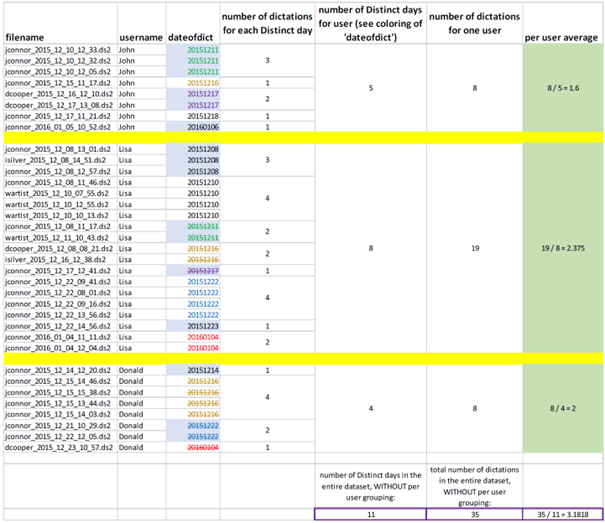
Users may expect that the average value of all data is the same as the average of the per-user averages: (1.6+2.375+2)/3=1.991667 – but this is wrong. Enterprise Statistic calculates it as 35/11=3.1818
Screenshot for reference. Please note that the result value is displayed as 3.182 due to rounding.
The number of transcription days within a given period
By querying the number of transcription days, you can calculate those days when the transcriptionists were transcribing dictations. Setting the begin and end periods is mandatory for this query.
Statistics result list elements
User name - the name of the selected transcriptionist(s).
Days - the number of days when the transcriptionist transcribed dictations.
Calculation method:
Only those days are calculated which are assigned with any dictation action’s EndTime. Only dictations with state Transcription Finished are taken into account.
The number of transcribed dictations within a given period
This query displays the number of transcribed dictations within the selected time interval. Setting the begin and end periods is mandatory for this query.
Statistics result list elements
User name - the name of the selected transcriptionist(s).
Amount - the number of transcribed dictations within the specified time interval.
Calculation method:
Calculates the number of dictations of which EndTime is in the specified time interval. Only dictations with state Transcription Finished are taken into account.
Total dictation length of transcribed dictations
This query displays the length of transcribed dictations. This statistic includes only dictations that are in Transcription finished state. If there are two dictations with the same dictation ID and length, then only that dictation will be included in this query of which Computer property is the first in alphabetical order. Therefore, if, for example, Transcriptionist A on Computer 6 and Transcriptionist B on Computer 2 begin dictating simultaneously and record the same length of dictation then only the dictation that Transcriptionist B was working on will be included in the query since the name of this computer is first in alphabetical order.
Statistics result list elements
User name - the name of the selected transcriptionist(s).
Total dictation length - the total dictation hours within the specified time interval.
Calculation method:
Summarizes dictation length of dictations. Only the most recently changed DetailedDictation records are included (EndTime value = the maximum EndTime values recorded for a given dictation ID). If there are more than one user actions for the same dictation with the same EndTime, then only that one is used which has the maximum ComputerName (in alphabetical order). Only those records are collected whose state is Transcription Finished.
Average time before a dictation has been transcribed
This query displays the average time that passed before a dictation was finally transcribed. This statistic includes only the dictations in Transcription finished state. The dictations that have been recorded again after the last transcription are left out from the query.
Statistics result list elements:
User name - the name of the selected transcriptionist(s).
Avg hours - the average time that passed before dictations were transcribed.
Calculation method:
Collects dictations with maximum EndTime which have been transcribed (state is Transcription Finished), and then subtracts the EndTime of the same dictation of which state is Recording Finished and has maximum EndTime.
Total online time per transcriptionist
This query summarizes the period during which individual transcriptionists used SpeechExec Player. This statistic includes only dictations that were transcribed within the specified interval.
Statistics result list elements
User name - The name of the selected transcriptionist(s).
Online time hours - The total time during which an author uses the Recorder/Player.
Calculation method:
Summarizes the OnlineTime fields. Only those DetailedDictation records are included of which EndTime value is in the specified time interval.
Transcription factor
The transcription factor statistics provides information on how long the process of transcription takes for individual transcriptionists. This is counted by dividing the sum of online time with the total dictation length within the specified time interval.
This statistic includes only dictations that are transcribed within the specified interval and are in Transcription finished state. If there are two or more dictations with the same dictation ID and ending at the same time, then only that dictation will be included in this query of which Computer property is the first in alphabetical order. For instance, if Transcriptionist A on Computer 6 and Transcriptionist B on Computer 2 begin dictating simultaneously and record the same length of dictation then only the dictation of Transcriptionist B will be included in the query since the name of this computer is first in alphabetical order.
Statistics result list elements:
User name - the name of the selected transcriptionist(s).
Factor - the sum of online time divided by the total dictation length.
Calculation method:
Calculates the sum online time and divides it by the sum of dictation length. Only the most recently changed DetailedDictation records are included (EndTime value = the maximum EndTime values recorded for a given dictation ID). If there are 2 or more records for the same dictation (dictation ID) and same EndTime, then only that one which has the maximum ComputerName (in alphabetical order) is used. State has to be Transcription Finished.
Average number of transcribed dictations per day
This query displays the average number of dictations per those days when the transcriptionist finished a transcription. This statistic includes only dictations that are in Transcription finished state.
Statistics result list elements:
User name - the name of the selected transcriptionist(s).
Average - the average number of dictations per day that the transcriptionist finished transcribing.
Calculation method:
Calculates those dictations of which EndTime is in the specified interval and divides this number with the number of days when the user created dictations (which is also determined based on the EndTime field). Only dictations with state Transcription Finished are taken into account.
Average dictation time and online time per day
This query summarizes two separate 'average time per day' counters: the average time that transcriptionists spent on transcribing dictations and the average time when the transcriptionists used SpeechExec Player. Only those dictations are included in this statistics that are in Transcription finished state.
Statistics Result list elements
User name - the name of the selected transcriptionist(s).
Avg dictation time - the average time (in hours) per day the transcriptionist spent on transcribing dictations.
Avg online time - the average time (in hours) per day when the transcriptionist actively used SpeechExec Player.
Calculation method:
Average dictation time: summarized EndTime - BeginTime divided by the number of those days when the user had dictations with state Transcription Finished.
Online time per day: summarized OnlineTime divided by the number of those days when the user had dictations with state Transcription Finished.
Average transcription online time per dictation
This query displays the average time per dictation during which a transcriptionist was using SpeechExec Player within the specified time interval. This statistic includes only dictations that are in Transcription finished state.
Statistics result list elements
User name - the name of the selected transcriptionist(s).
Average - the average time (in minutes) per dictation the transcriptionist actively used SpeechExec Player.
Calculation method:
Summarizes Online Time in the specified interval divided by the summarized number of dictations of the user in the same interval. Only dictations with state Transcription Finished are taken into account.
Other statistics
This chapter describes the statistics queries that are available for analyzing the dictations from various perspectives. The available queries are described in the following sections:
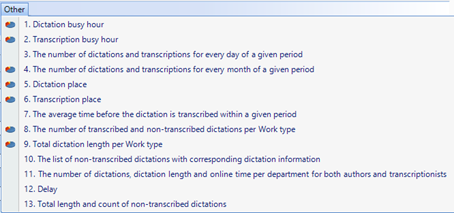
Dictation busy hours
Transcription busy hours
The number of dictations and transcriptions for every day of a given period
The number of dictations and transcriptions for every month of a given period
Dictation place
Transcription place
The average time before the dictation is transcribed within a given period
The number of transcribed and non transcribed dictations per work type
Total dictation length per work type
The list of non-transcribed dictations with corresponding dictation information.
The number of dictations, dictation length and online time per both authors and transcriptionists
Delay
Total length and count of non-transcribed dictations.
The following chapters describe in detail the functions.
Dictation busy hours
This query displays the number of recorded dictations for every hour of the selected day.
Statistics result list elements:
Hour - the hours of theselected day.
Activity - the number of recorded dictations in each hour of the selected day.
Calculation method:
Count of dictation records for every hour when EndTime of the dictation user action is in the current hour. Only users with role 0 (Author) are taken into account.
Transcription busy hours
This query displays the number of finished transcriptions for every hour of the selected day.
Statistics result list elements
Hour - the hours of the selected day.
Activity - the number of transcribed dictations in each hour of the selected day.
Calculation method:
Calculates the number of dictation records for every hour when EndTime of the dictation user action is in the current hour. Only users with role 1 (Transcriptionist) are taken into account.
The number of dictations and transcriptions for every day of a given period
This query displays the number of finished dictations and finished transcriptions for every day of the specified time interval.
Statistics result list elements
Dictation number - the number of finished dictations on a given day.
Transcription number - the number of transcribed dictations on a given day.
Day of a period - the day of the selected time interval in mm/dd/yyyy format.
Calculation method:
Calculates the number of finished dictations and the number of finished transcriptions for every day of the specified time interval. Those dictations whose EndTime field is out of the specified interval will not be included.
The number of dictations and transcriptions for every month of a given period
This query displays the number of finished dictations and finished transcriptions for every month of the specified time interval.
Statistics result list elements
Dictation number - the number of finished dictations in a given month.
Transcription number - the number of transcribed dictations in a given month
Month of a period - the month of the selected time interval in yyyy/mm format.
Calculation method:
Calculates the number of finished dictations and the number of finished transcriptions for every month of the specified time interval. Those dictations, whose EndTime field is out of the specified interval, will not be included.
Dictation place
This query displays the number of finished dictations on every Computer that was created in the specified time interval.
Statistics result list elements
Computer - the name of the computer where the dictation was created.
Dictation number - the number of finished dictations in the selected time interval.
Calculation method:
Calculates the number of dictations of which role is 0 (Author), grouped by Computer.
Transcription place
This query displays the number of transcriptions on every Computer that was finished in the specified time interval.
Statistics result list elements
Computer - the name of the computer where the transcription was done.
Dictation number - the number of finished transcriptions in the selected time interval.
Calculation method:
Calculates the number of dictations of which role is 1 (Transcriptionist), grouped by Computer.
The average time before the dictation is transcribed within a given period.
Calculation method
The average number of days between Transcription Pending state and Transcription Finish state of dictations. Only those dictations will be included which has Transcription Pending state record and Transcription Finish state record in the specified time interval.
The number of transcribed and non-transcribed dictations per work type
This query displays the number of dictations grouped by work type and whether they are finished (state is Transcription finished) or not (state is not Transcription finished).
Statistics result list elements
Work type - the name of the work type that contains the transcribed dictations.
Transcribed - this field categorizes dictations for each work type on the basis of whether the dictations were transcribed or not.
Non-transcribed - the number of transcribed and non-transcribed dictations that for each work type.
Calculation method:
Calculates the number of dictations grouped by Work type and whether they are finished (state is Transcription Finished) or not (state is not Transcription Finished).
Total dictation length per work type
This query summarizes the length of finished dictations for each work type. If there are two or more transcriptions for the same dictation, the statistic includes only the dictation of which Computer property is first in alphabetical order. Statistics result list elements
Work type - the name of the work type that contains the dictations.
Total dictation length - the total length of dictations for each work type.
Calculation method:
Sums up the length of dictations. Only the most recently changed DetailedDictation records are included (i.e. EndTime value = the maximum of EndTime values recorded for a given dictation ID). If there were more than one typing sessions for the same dictation (dictation ID) and same EndTime, then only that one is used which has the maximum ComputerName (in alphabetical order). Result set is grouped by Category.
The list of non-transcribed dictations with corresponding dictation information
This query provides detailed information on finished dictations that are not yet in Transcription finished state. If there are two or more dictations with the same ID, only that dictation will be included in the query of which Computer property is first in alphabetical order. If a dictation was transcribed once and it is reopened for dictation, it will not be included in the result of the query.
Visible properties
Here you can select the properties to be displayed under Statistics result list elements by checking in the checkboxes of the elements.
Statistics result list elements
Author name - the name of the author of the dictation.
Begin time - the time ofstarting the last action on the dictation. The last action is visible in the State field.
Computer - the name of the computer where the dictation was last processed.
Custom 1-5 - the custom properties information, if they were filled in.
Department - the name of the department where the dictation was processed.
Dictation ID - the unique identifier of the dictation.
Dictation length - the length of the dictation.
End time - the time of completing the last action on the dictation.
File name - the name of the dictation file on the user's computer.
Online time - the total time that the user spent on actively using the Recorder/Player while managing the dictation.
Priority - the priority of the dictation.
Role - this field shows if the dictation is associated with an author or a transcriptionist.
State - the last state of the dictation within the specified time interval.
Transcriptionist name - the name of the transcriptionist who transcribes the dictation.
Work type - the work type of the dictation.
Calculation method:
Information about those DetailedDictation records, which:
Have maximum EndTime (If there are 2 or more records for the same dictation ID with the same EndTime, then only that one is used which has the maximum ComputerName (in alphabetical order)), and
There aren’t any other DetailedDictation records with the same dictation ID where the dictation state is Transcription Finished.
If a dictation was transcribed one time (there is a record with Transcription Finished state), and is “reopened” again for dictation, it won’t be included in the result set. Only dictations with Role 0 (Author) are retrieved.
The number of dictations, dictation length and online time per department for both authors and transcriptionists
This query provides information (grouped by department and role) on the number of dictations, dictation length and the time spent on actively using the Recorder/Player.
Statistics Result list elements
Department - the name of the department where the dictation was processed.
Role - this field shows if the dictation is associated with an author or a transcriptionist.
Number of dictations - the number of dictations per department and role.
Dictation length - the total length of dictations.
Online time - the total time that the authors or transcriptionists spent on using the Recorder/Player while processing the dictations.
Calculation method:
This is a summary of the following 6 previously described queries
Total amount of dictations within a given period
Total amount of dictating time within a given period
Total online time per author
The number of transcribed dictations within a given period
Total dictation length of transcribed dictations
Total online time per transcriptionist
Delay
This query lists dictations, whose transcription has not been finished yet, that is, their state has not yet changed to Transcription finished.
Visible properties
Here you can select the properties to be displayed under Statistics result list elements by checking in the checkboxes of the elements.
Statistics result list elements
Author name - the name of the author of the dictation.
Begin time - the time of starting the last action on the dictation. The last action is visible in the State field.
Computer - the name of the computer where the dictation was last processed.
Custom 1-5 - the custom properties information, if they were filled in.
Delay - the period of time that has elapsed from the time that the state of the dictation became Transcription pending until the actual time.
Department - the name of the department where the dictation was processed.
Dictation ID - the unique identifier of the dictation.
Dictation length - displays the length of the dictation.
End time - the time of completing the last action on the dictation.
File name - the name of the dictation file on the user's computer.
Online time - the total time that the user spent on actively using the Recorder/Player while managing the dictation.
Priority - the priority of the dictation.
Role - this field shows if the dictation is associated with an author or a transcriptionist.
State - the last state of the dictation within the specified time interval.
Transcriptionist - the name of the transcriptionist who transcribes the dictation.
Work type - the work type of the dictation.
Calculation method:
Information about those DetailedDictation records, which:
have a maximum EndTime value (If there are 2 or more records for the same dictation ID with the same EndTime, then only that one is used which has the maximum ComputerName (in alphabetical order)), and
there aren’t any other DetailedDictation records with the same dictation ID where dictation state equals Transcription Finished but there is at least one DetailedDictation record with the same dictation ID where dictation state equals Transcription Pending.
The query returns an additional Delay column which contains the period of time that has elapsed from the time that the state of the dictation became Transcription Pending until the actual time.
Total length and count of non-transcribed dictations
This query provides detailed information on dictations that are not yet in Transcription finished or Correction finished state.
Statistics result list elements
User name - The name of the author of the dictation.
Transcriptionist name - The name of the transcriptionist who transcribes the dictation.
Number of dictations - The number of dictations that are not transcribed or corrected in the selected time interval.
Dictation length - The length of the dictation.
Dictations statistics
This chapter describes the dictation statistics query with which you can run a comprehensive analysis on several dictations at one time and the Delete statistics function with which dictation information can be deleted. The available functions are described in the following sections:
Job statistics
Delete statistics
Job statistics
This query provides information on dictations that the users are working on. By double-clicking a dictation, you can see the details of the modifications that users performed. Visible properties Here you can select the properties to be displayed under Statistics result list elements by checking in the checkboxes of the elements.
Statistics result list elements
Author name - the name of the author of the dictation file.
Comment - the comment of the user related to the dictation file.
Computer - the name of the computer where the dictation file was last changed.
Creation - the time of creating the dictation file.
Custom 1-5 - the custom properties information, if they were filled in.
Delay from creation (days) - the elapsed time since the creation of the dictation file.
Delay from download (DPM) (days) - the elapsed time since the download of the dictation file from the Digital Pocket Memo device.
Delay from last modification (days) - the elapsed time since the last modification of the dictation file.
Department - the name of the department where the dictation file was modified.
Dictation ID - the unique identifier of the dictation file.
Dictation length - the length of the dictation file.
Download date and time (DPM) - the date and time when the dictation file was downloaded from the Digital Pocket Memo.
Download date (DPM) - the date when the dictation file was downloaded from the Digital Pocket Memo.
Download time (DPM) - the time when the dictation file was downloaded from the Digital Pocket Memo.
Download month name (DPM) - the name of the month when the dictation file was downloaded from the Digital Pocket Memo.
Download day of week (DPM) - the day of the week when the dictation file was downloaded from the Digital Pocket Memo.
File name - the path and name of the dictation file.
Last modify - the time when the last changes were made on the dictation file.
Last role - the role of the user who last modified the dictation file.
Last user - the name of the last user who modified the dictation file.
Online time - displays the total time that the user spent on actively using the Recorder/Player while managing the dictation file.
Priority - the priority of the dictation file.
State - the last state of the dictation file within the specified time interval.
Total lifecycle (days)
Total lifecycle (time)
Transcriptionist - the name of the transcriptionist who transcribes the dictation file.
Worked time in seconds - this filed shows the time in seconds that the user spent on working with the dictation file.
Work type - the work type of the dictation file.
After double-clicking a dictation, the following additional list elements are displayed:
Begin time - the time of starting the last action on the dictation file. The last action is visible in the State field.
End time - the time of completing the last action on the dictation file.
Role - the role of the user who last modified the dictation file.
Calculation method of various values:
Delay from creation: days of CurrentDate - CreationDate
Delay from download (DPM): days of CurrentDate - DpmDownloadDate
Delay from last modification: days of CurrentDate – LastModificationDate
Total lifecycle: days of LastModificationDate – CreationDate
Total lifecycle (time): time of LastModificationDate – CreationDate in the following format: days.hours:minutes:seconds
Worked time in seconds: sum of all (BeginTime - EndTime)
By double-clicking a row, the details of all user modifications are displayed. These details include BeginTime, EndTime and OnlineTime values.
Delete statistics
Here you can delete all statistics that are older than the specified date. To delete dictations, select a date from the calendar and click the Execute button.
Dictation methods
This section describes the statistics queries that are available for analyzing the efficiency of transcriptionists. To calculate efficiency, SpeechExec measures turnaround time (TAT), which is the time spent on finishing the full workflow of a dictation from the time of creation, until the transcription is finished. SpeechExec provides the following dictation methods:
Digital dictation and transcription
In this method, the author creates a dictation and a separate typist transcribes the dictation.
Dragon SR with self-correction
The author of the dictation uses the Dragon recognition engine to transcribe the dictation. Subsequently, the author corrects the transcription in the Correction window.
Dragon SR with typist correction
The author of the dictation uses the Dragon recognition engine to transcribe the dictation. Subsequently, a separate typist corrects the transcription.
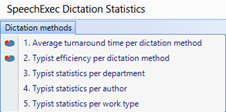
Average turnaround time per dictation method
This query displays the turnaround time of finished dictations that were created in the specified time interval.
Statistics result list elements
Dictation method – the name of the dictation method that was used to create the dictation and its transcription.
The following dictation methods are available:
Digital dictation and transcription
Dragon SR with self-correction
Dragon SR with typist correction
Avg turnaround time – the average time to finish the complete workflow of creating and transcribing a dictation.
Avg dictation length – the average length of dictations in the specified time interval.
Calculation method:
Calculates the average of the most recent EndTime with state Transcription Finished and the first BeginTime with state not Transcription Finished.
Possible values of Dictation method:
Digital dictation and transcription
Dragon SR with self-correction
Dragon SR with typist correction
Typist efficiency per dictation method
This query displays a selected transcriptionist's efficiency per dictation method in the specified time interval.
Statistics result list elements
Dictation method - The name of the dictation method that was used to create the dictation and its transcription. The following dictation methods are available:
Digital dictation and transcription
Dragon SR with self-correction
Dragon SR with typist correction
Typist efficiency (%) - the efficiency of the typist calculated as the maximum dictation length in seconds divided by the total time when the typist worked in seconds.
Avg dictation length - the average length of dictations in the specified time interval.
Calculation method:
The average DictationLength divided by the average OnlineTime of the Typist (multiplied by 100 to get a percentage value). The value of OnlineTime is calculated based on the Dictation method in the following way:
Digital dictation and transcription: only dictations with role 1 (Transcriptionist) are taken into account
Dragon SR with self-correction: dictations with role 0 (Author) and state Transcription Finished are omitted from calculation
Dragon SR with typist correction: only dictations with state Transcription Finished and Correction Suspended are taken into account
Typist statistics per department
This query displays the statistics of typists for each department in the specified time interval.
Statistics result list elements:
Department - The department of the author who created the dictation.
Speech recognition only - The number of dictations, which have already been transcribed by a speech recognition engine but have not been corrected.
Speech recognition with correction - The number of dictations that a speech recognition engine has already recognized and a typist has corrected the transcription.
Digital dictation and transcription - The number of dictations that a typist has already transcribed.
Calculation method:
Summarizes the number of dictations per dictation method for the specified Department. Only dictations with state Transcription Finished are taken into account.
Typist statistics per author
This query displays the statistics of typists for each author in the specified time interval.
Statistics result list elements:
Author name - the name of the author who created the dictation.
Speech recognition only - the number of dictations, which have already been transcribed by a speech recognition engine but have not been corrected.
Speech recognition with correction - the number of dictations that a speech recognition engine has already recognized and a typist has corrected the transcription.
Digital dictation and transcription - the number of dictations that a typist has already transcribed.
Calculation method:
Summarizes the number of dictations per dictation method for the specified Author name. Only dictations with state Transcription Finished are taken into account.
Typist statistics per work type
This query displays the statistics of typists for each work type in the specified time interval.
Statistics result list elements:
Work type - the work type of the transcribed dictation.
Speech recognition only - the number of dictations, which have already been transcribed by a speech recognition engine but have not been corrected.
Speech recognition with correction - the number of dictations that a speech recognition engine has already recognized and a typist has corrected the transcription.
Digital dictation and transcription - the number of dictations that a typist has already transcribed.
Calculation method:
Summarizes the number of dictations per dictation method for the specified Work type. Only dictations with state Transcription Finished are taken into account